
 MacStories


 Mac4ever
 iGeneration
Control a room from a Home Screen widget
Turn the living room lights on together, switch the room off at bedtime, or keep your garden controls close by. Room controls can also adjust brightness and color for compatible lights.
Open a camera or your camera mosaic, dim the lights, set the thermostat or switch off a whole room. All from custom Home Screen panels, Lock Screen widgets and Apple Watch.

Free download
Featured in
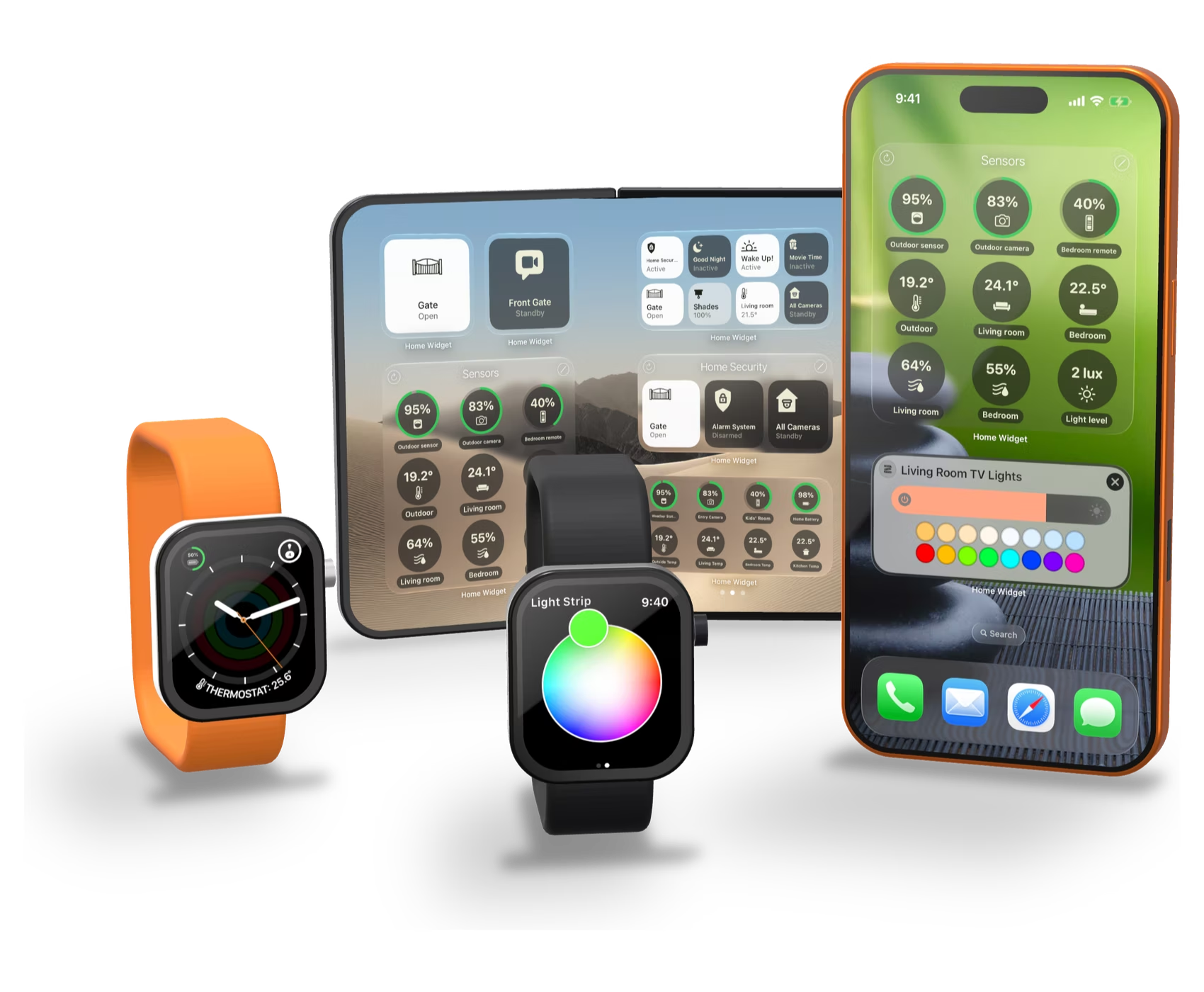
Home Widget adapts its panels and backgrounds to both screens of iPhone Duo, folded or unfolded.
DiscoverAll your HomeKit cameras on one screen. Choose them, order them, feature the important ones, and open the mosaic from a widget, the Lock Screen or Control Center.
See the cameras
A single Home Screen widget with up to 28 items: scenes, lights, sensors, cameras and shortcuts together, on compatible iOS 27 devices.
Make it yours
Set the target temperature and switch heating or cooling modes right from an interactive Home Screen panel, or open the thermostat from the Lock Screen.
Adjust the climate
Home Widget panels follow the Home Screen’s default, dark, clear and tinted styles, so they blend with your wallpaper and icons.
See the styles
Run Home Widget on a Mac with Apple silicon to control your HomeKit home and keep its widgets on your desktop.
Learn more
Built around your routines
Home Widget for HomeKit gives iPhone and iPad users custom Home Screen and Lock Screen widgets for smart home control: launch a scene, control a room’s lights, open a HomeKit camera or camera mosaic, adjust light brightness and color, position blinds, change a thermostat setpoint, and display individual sensor and battery readings. Apple Watch controls keep these everyday tasks within reach on your wrist.
Small to Extra Large panels, with up to 28 items.
Circular, inline and rectangular widgets.
Panels, Smart Stack widgets and complications.
Open a camera or your camera mosaic.

Home Screen panels
Mix accessories, scenes, shortcuts, sensor readings and cameras in the same widget. Create a panel, add your actions, then place the widget: a personal control panel in minutes.
Turn the living room lights on together, switch the room off at bedtime, or keep your garden controls close by. Room controls can also adjust brightness and color for compatible lights.

Lights
Dim the living room for a movie, choose a warmer reading light or change the color of a lamp. Control one light or the lights in a room without preparing a scene for every setting.
Use interactive Home Screen controls, or tap a Lock Screen widget to open the light control in the app.

Cameras New camera mosaic
See who is at the front door, check the driveway or look in on your pets. Give the camera you use most its own Home Screen or Lock Screen widget.
The widget opens the selected camera in Home Widget. Audio options depend on the camera.
Check the front door, garden and garage on one screen. Choose your cameras, arrange their order and give your most important views more space.
Launch the mosaic in Home Widget from a Home Screen widget, Lock Screen widget or Control Center.
Add a Home Widget control to Control Center to open a selected camera or your camera mosaic, with the camera set and supported audio mode you choose.

Climate, blinds & sensors
Warm up the living room before relaxing or lower the target temperature at bedtime. Change the setpoint or a heating/cooling mode supported by your thermostat.
Let in the morning light or lower the blinds partway for privacy. Pick an intermediate position instead of choosing only fully open or fully closed.
Keep the nursery temperature, bathroom humidity or an accessory battery visible. Choose the readings that matter to you, including accessories from several HomeKit homes.

Lock Screen
Open a compatible gate or garage when you arrive. Turn on an accessory or run your Welcome Home scene from a widget you configured for that action.
One tap starts the action. Security actions may require authentication or confirmation.

Apple Watch
Check a camera, dim a light or activate a scene when your iPhone is out of reach. Put the controls and readings you use most on your wrist.
Use Home Widget panels, watch face complications and Smart Stack widgets.

Make it yours
Choose your icons, names, colors, transparency, blur and backgrounds for each panel. Home Widget follows the clear and tinted Home Screen styles, so your controls match your wallpaper.
More ideas
Add counters for open doors, unsecured locks and unreachable accessories. One glance at your panel tells you whether the house is ready.
Put your favorite shortcuts in the same panel as your accessories and scenes, and launch your custom flows with a tap.
Keep your home, a holiday house or a relative’s place side by side: a panel can combine accessories from several HomeKit homes.
Fill the iPad Home Screen with extra-large panels: lights, scenes, temperatures and cameras, ready for the whole family.
Sync your panels across your devices with iCloud, and share the ones you crafted so everyone gets the same controls.
Keep compact panels on the outer screen and a full dashboard on the large inner screen, each with its own background.
Install Home Widget on a Mac with Apple silicon: your HomeKit panels and widgets are there while you work.
Show a temperature, the number of lights that are on or a battery level in a complication, right on your watch face.
App Store reviews
average on more than 550 App Store ratings.
“The most notable thing is how fast the widget or the lock screen control launches the live camera feed.”
App Store, United States
“For me, it is by far the best app in this category on the entire App Store.”
App Store, Germany · translated from German
“If you use any HomeKit devices, this app is essential.”
App Store, Canada
“I love this App to control my Apple Home devices! Works perfect! And does much better than the native Apple Home App!”
App Store, Switzerland
“I can highly recommend this for anyone in the Apple home ecosystem.”
App Store, Australia
“This one definitely is a keeper. Great app, looks beautifully and works like a charm.”
App Store, Netherlands
“Personally, I think it is the best option to have your whole smart home in one place and always within reach.”
App Store, Spain · translated from Spanish
“A wonderful app, see and control HomeKit from your phones home Screen. Just brilliant, very well implemented.”
App Store, United Kingdom
“Excellent app, I think the best of its kind.”
App Store, Italy · translated from Italian
Home Widget and Apple Home
Apple’s Home widgets already let you toggle accessories and activate scenes. Home Widget is for people who want more than those basic actions, in a dashboard built around their routines.
 What Home Widget adds
A tap can run an action or open its control. Choosing a color, blind position or target temperature takes a further adjustment. Cameras open in Home Widget; video is not played inside the Home Screen or Lock Screen widget. Accessory support, authentication and widget refresh behavior depend on HomeKit and the system.
Press
For Tech Times, Home Widget closes two of the most consistently requested gaps in iOS widget-based home control
. TechRadar calls it already a favorite
that scratches a big itch
, HomeKit Blog a game-changer
, and Hueblog definitely a great solution for your homescreen
. In Germany, HomeKits.de ranks it among the most-used third-party apps, especially on iPad
, and Apfelpage notes it is among the first third-party apps
to support the new Extra Large Portrait format (both translated from German).
“Home Widget builds the control panel that Apple didn’t.”
“I highly recommend checking out Home Widget.”
“Highly capable and highly recommended for any HomeKit user.”
“Home Widget is one of the best apps for HomeKit.”
“Home Widget 1.10 wants to (almost) make you forget Apple’s Home app.”
“Version 1.10.3 extends its lead over Apple’s own Home widgets.”
At a glance
FAQ
Something missing? Write to contact@vision-apps.com.
Yes. Home Widget is free to download on the App Store and you can build your first panels for free. Some panel, customization and advanced features require Home Widget Premium, available as a lifetime purchase or a monthly or annual subscription, with Family Sharing.
Home Widget runs on iPhone and iPad with iOS or iPadOS 17 or later, on Apple Watch with watchOS 10 or later, and on Macs with Apple silicon. Version 1.10.5 adds iPhone Duo support. Extra Large Portrait panels need a compatible device running iOS 27.
Apple’s Home widgets already toggle accessories and activate scenes. Home Widget adds a personal dashboard with adjustable light, blind and thermostat controls, direct camera and camera-mosaic access, individual sensor readings, accessory batteries and shortcuts. You choose the layout, icons, names and backgrounds.
Yes. Configure a Home Widget Lock Screen widget for a selected camera or a camera mosaic. A tap opens that view in Home Widget. You can also launch it from a Home Screen widget or Control Center. Camera video is displayed in the app, not inside the widget.
Yes, for compatible HomeKit accessories. Interactive Home Screen panels provide light and thermostat controls and position adjustment for supported blinds. A Lock Screen widget can open the matching control in the app. Tapping opens the control; selecting a color, position or temperature requires a further adjustment.
Yes. Add a room action to your panel to switch that room’s lights on or off together. Room controls can also adjust brightness and color for compatible lights. Combine room actions with individual accessories, scenes and shortcuts in the same panel.
Yes. Home Widget includes Apple Watch panels, Smart Stack widgets and watch face complications. Reach cameras, lights, scenes and sensor readings from your wrist.
Use accessories, scenes and cameras already configured in Apple’s Home app, and grant Home Widget access to your Home data. Non-HomeKit devices need to be exposed to HomeKit through a compatible bridge first. Features depend on your accessories, devices and system version. Security actions may require authentication or confirmation.
The system controls how often widgets refresh in the background. Home Widget refreshes panels when you use a widget or open the app, and you can add a refresh action for manual updates. A displayed value is not a guarantee of continuous real-time monitoring.
Some panel, customization and advanced features require Home Widget Premium. It is available as a lifetime in-app purchase or a monthly or annual subscription, with Family Sharing enabled.
Send your questions or ideas to contact@vision-apps.com. For accessory support, include its brand and model and describe what you want to do.
Free download for iPhone, iPad, Mac and Apple Watch. Premium optional.